In this post
Starting November 4, 2026, any user in your tenant, not just admins and developers, can create agent blueprints in Microsoft Entra, unless you switch the new Users can create agent blueprints setting to No. Microsoft announced it in Message Center post MC1506733.
At a glance
| Item | Detail |
|---|---|
| Message Center ID | MC1506733, “Action may be required: Review who can create agents in Microsoft Entra” (published October 13, 2026) |
| Setting | Users can create agent blueprints (the portal may label it Users can register agent identity blueprints) |
| Where | Entra admin center > Entra ID > Users > User settings > Default user role permissions |
| Default | Yes (on) |
| Rollout | Starts November 4, 2026; expected to finish by late November 2026, worldwide |
| Who is affected | “Default users”: anyone without a built-in or custom Entra role |
| Action | Optional. Set it to No if you don’t want regular users creating agents |
| Can I change it now? | Yes. The setting is already visible, and your choice is respected when rollout reaches your tenant |
First, what is an agent blueprint?
An agent blueprint is a template in Microsoft Entra Agent ID that is used to create identities for AI agents and to get sign-in tokens for them (Microsoft Learn). Think of it like an app registration, but for AI agents.
The chain works like this:
-
- Someone creates an agent blueprint (the template).
-
- From that blueprint, agent identities are created, one per agent.
-
- Those agents can then be given permissions to data and services.
One detail matters a lot here: whoever creates a blueprint automatically becomes its owner, and owners can create agent identities from it without any Entra role (Microsoft Learn). So letting a user create a blueprint also lets them start creating agents.
What is changing
Until now, only people with the Agent ID Developer or Agent ID Administrator role could create agent blueprints. Microsoft is adding a new switch under Default user role permissions, and it starts out set to Yes (MC1506733).
| Who | Before the rollout | After Nov 4, setting = Yes (default) | After Nov 4, setting = No |
|---|---|---|---|
| Regular users (no Entra role) | Cannot create | Can create | Cannot create |
| Agent ID Developer role | Can create | Can create | Can create |
| Agent ID Administrator and other supported admins | Can create | Can create | Can create |
What the change does not do, per Microsoft:
-
- It does not change or remove blueprints that already exist.
-
- It does not change who can create agent identities from existing blueprints.
-
- It does not stop an app or an agent from creating identities.
-
- It does not change the requirements inside products like Microsoft Foundry or Security Copilot (licenses, Azure subscriptions).
The new switch is separate from the long-standing Users can register applications setting. Turning one off does not turn off the other, so check both.
Where to find the setting
The switch lives at Microsoft Entra admin center > Entra ID > Users > User settings > Default user role permissions. Microsoft’s Message Center post includes a direct link to the User settings page.
A naming quirk: Microsoft’s announcement and docs call it Users can create agent blueprints. Some admins report the portal label reads Users can register agent identity blueprints, sitting right below “Users can register applications” (Jan Bakker). It’s the same switch.
About screenshots: Microsoft has not published an official screenshot of this toggle. Its how-to page for the setting, Restrict who can create agents, is text only. The official images that do exist:
-
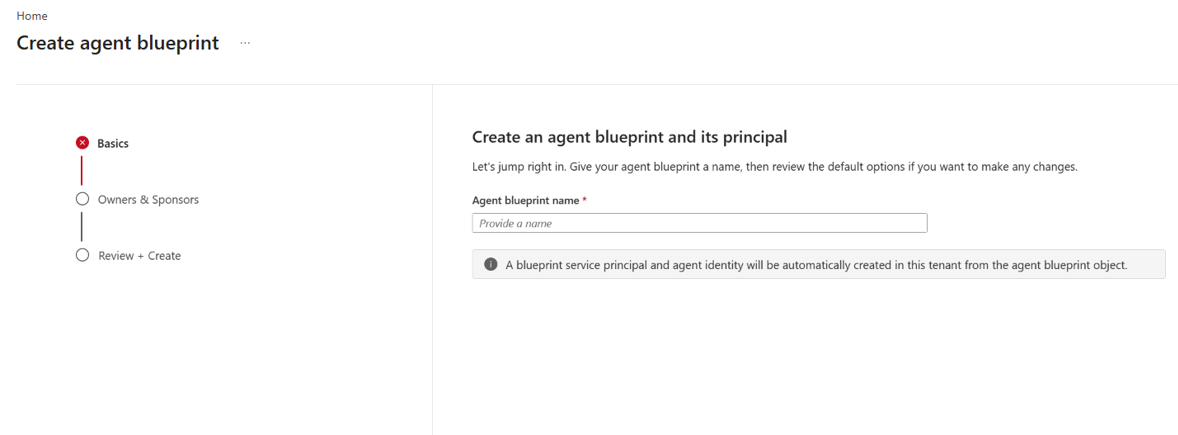
- Microsoft screenshot: the “New agent blueprint” wizard, showing what users will be able to open at Entra ID > Agents > Agent blueprints (source page).
-
- For a picture of the toggle itself, Tony Redmond’s Office 365 for IT Pros article shows it in Figure 1 (third-party, not Microsoft).
What admins should do before November 4
Decide whether everyday users should be building agents. If not, switch the setting off now; Microsoft says your choice takes effect when the rollout reaches your tenant.
Turn it off in the admin center (needs at least the Cloud Application Administrator role):
-
- Sign in to the Microsoft Entra admin center.
-
- Go to Entra ID > Users > User settings.
-
- Under Default user role permissions, set Users can create agent blueprints to No.
-
- Select Save.
Or with Microsoft Graph PowerShell. Community write-ups report the setting maps to the beta property allowedToCreateAgentIdentityBlueprints on the authorization policy (IT Pro Tips). Microsoft hasn’t documented it yet, so test first:
Connect-MgGraph -Scopes "Policy.ReadWrite.Authorization"

$params = @{
    defaultUserRolePermissions = @{
        allowedToCreateAgentIdentityBlueprints = $false
    }
}

Invoke-MgGraphRequest -Method PATCH `
  -Uri "https://graph.microsoft.com/beta/policies/authorizationPolicy/authorizationPolicy" `
  -Body ($params | ConvertTo-Json -Depth 10) -ContentType "application/json"
Then give access to the people who need it. Assign the Agent ID Developer role to your agent builders. It lets them create and manage blueprints without broader admin rights.
While you’re there, review the related settings:
-
- Users can register applications (Entra ID > Users > User settings)
-
- User consent to apps (Entra ID > Enterprise apps > Consent and permissions)
-
- Existing blueprints (Entra ID > Agents > Agent blueprints)
Quick FAQ
If I do nothing, what happens? From the rollout (Nov 4 to late Nov 2026), any user without an Entra role can create agent blueprints, and then agents from them.
If I turn it off, will existing agents break? No. Existing blueprints and the agents made from them are untouched.
Does turning it off block Copilot Studio or Microsoft Foundry agents? Not by itself. Those platforms keep their own controls and requirements, and apps or agents can still create identities.
Can I set it now, before the rollout? Yes. The setting is already in the portal, and Microsoft says your choice applies when the rollout reaches you.
Who can still create blueprints when it’s off? Supported admins and anyone with the Agent ID Developer role.