In this post
Summary
Microsoft Entra ID self-service password reset (SSPR) will accept only authentication methods that a user or admin explicitly registered, with enforcement beginning November 7, 2026 and rolling out gradually through mid-November. Microsoft moved the date back from early September, so admins have a few more weeks, but the registration campaign is already running. Phone numbers and email addresses that sit in the directory as profile attributes will stop counting. A user with no registered method will not be able to complete a reset and will need an administrator. The change covers all users, including administrators, in the public cloud, GCC, GCC High and DoD.
What changed
Today, SSPR can verify a user against contact details stored as properties on the user object, such as a mobile number or alternate email populated by an HR or identity sync. The user never had to register those values in My Security Info. At enforcement, that fallback ends.
| Until enforcement | After enforcement | |
|---|---|---|
| Directory phone or email attribute | Accepted for SSPR verification | Not accepted unless registered as an authentication method |
| Explicitly registered method | Accepted | Accepted |
| User with no registered method | Can still reset | Reset fails; user must register a method or contact an administrator |
Microsoft’s schedule in message center item MC1325414, updated August 4, 2026, sets the key dates below. Microsoft says about 86 percent of SSPR verifications already use registered methods, so the people hit hardest are the remainder, often accounts whose contact details came only from a sync.
| Date | Event |
|---|---|
| October 5, 2026 | Registration campaign begins, prompting users and admins who lack enough registered methods |
| November 7, 2026 | Enforcement begins, rolling out gradually through mid-November |
Microsoft’s own materials are inconsistent on the exact day: the item’s title and action-required note say November 9, while the rollout schedule says November 7. Treat November 7 as the deadline and confirm the date in your tenant’s message center. Earlier coverage citing September 7 and a July 6 campaign start is outdated.
Why it matters in higher education
Universities provision accounts in bulk, often from a student information system or HR feed, and those feeds commonly write phone numbers and personal emails into directory attributes without anyone registering them as methods. Those are the accounts most likely to fail SSPR at enforcement. The groups below are where that is most likely to show up; this is practical inference, not Microsoft guidance, so check your own registration data.
- Incoming students: accounts created from admissions data may carry a phone number but no registered method, and the fall term has just brought a large new cohort.
- Seasonal, adjunct and part-time staff: they sign in infrequently, so they may have skipped the registration campaign.
- Alumni and affiliates: long-dormant accounts often hold stale directory contact details.
- Admins: the change applies to administrator accounts too, so confirm every admin has a registered method.
- Shared and service-style accounts: these rarely have a person to register a method for them.
Finding affected users
The fastest check needs no script: in the Entra admin center, open Authentication methods > User registration details and filter on SSPR Capable: Not Capable. Each account falls into one of these states:
- SSPR Registered: the user has registered authentication information.
- SSPR Enabled: the user is in scope for the tenant’s SSPR policy.
- SSPR Capable: the user has enough allowed methods to meet the policy, which requires one or two methods depending on configuration.
Focus on users who are enabled but not capable. They are the ones who will fail a reset. Compare the list against your SSPR policy, since the number of required methods and the allowed method types decide who counts as capable.
Admin checklist
- Export the not-capable list from User registration details now, since the October 5 campaign is already prompting users, and segment it by population (students, employees, alumni, admins).
- Confirm every administrator has at least one registered method.
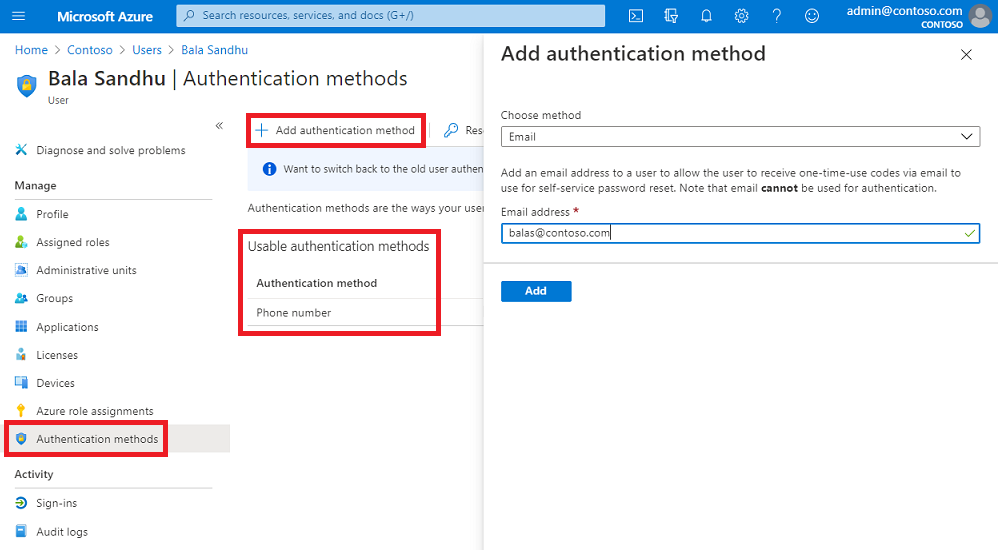
- For users with a valid phone number in the directory, register it as an authentication method: an admin can add it from the user’s Authentication methods card in the admin center or through the Microsoft Graph authentication methods API.
- Review the SSPR policy: number of methods required and which method types are allowed.
- Check whether your provisioning or HR sync writes contact attributes, and decide whether it should also register methods.
- Brief the help desk on the new failure mode and the verification steps for manual resets before November 7.
- Re-run the not-capable report weekly until the count stops falling, and once more just before enforcement.
Communicating with users
Keep the message short and action-first: tell people to open My Security Info and register at least one method now, before they are locked out and need a reset. Send it through channels that reach people who rarely sign in, such as the student portal, orientation material and department newsletters, and name the help desk contact for anyone already locked out. Give the help desk a single script for verifying identity before it adds a method on a user’s behalf.
Sources
As of October 24, 2026.
- MC1325414: Microsoft Entra ID SSPR will require registered authentication methods (Microsoft message center item, updated schedule; copy on a third-party archive)
- MC1325414 on Merill’s message center viewer
- Microsoft Entra ID security updates: What organizations need to do now (Microsoft)
- Prepopulate contact information for SSPR (Microsoft Learn; its dates appear inconsistent)
- Microsoft Delays SSPR and Entra Connect Sync Changes (explains the delay)
- Entra SSPR Registered Methods: MSP Audit Checklist (notes the November 7 versus 9 inconsistency)
- Entra SSPR: enforcement of registered methods (admin center steps; its September date is outdated)
- Microsoft Entra SSPR: Readiness Guide (SSPR registered, enabled and capable definitions; its September date is outdated)
- Entra ID SSPR From Sept 7, 2026 (HR sync context; its September date is outdated)